Extracting Satellite Arcs
This page describes the extract_arcs module and highlights some useful features. It was produced for version 3.19.2 and may be out of date.
Please visit the function definition page to view the most recent API reference.
Overview
The extract_arcs module provides a clean API for accessing SNR/geometry data and associated metadata of individual satellite arcs within an SNR file.
Two convenience functions cover the most common workflows:
Function |
Use when you have… |
|---|---|
|
a station name, year and day-of-year |
|
a direct path to an SNR file |
Quick Start
import numpy as np
from gnssrefl.extract_arcs import extract_arcs_from_station

# Extract arcs across all available frequencies
arcs = extract_arcs_from_station('mchl', 2025, 11)

print(f'{len(arcs)} arcs found')
for meta, data in arcs[:3]:
    print(f"  sat {meta['sat']:3d}  freq {meta['freq']:3d}  "
          f"{meta['arc_type']:7s}  az={meta['az_min_ele']:5.1f}  "
          f"delT={meta['delT']:.1f} min  pts={meta['num_pts']}")
# 457 arcs found
#   sat 202  freq 206  rising   az=290.4  delT=128.0 min  pts=257
#   sat 203  freq 206  rising   az=219.8  delT=67.0 min  pts=135
#   sat 203  freq 206  setting  az=330.0  delT=84.0 min  pts=169
You can also request specific frequencies, or pass a path directly:
arcs = extract_arcs_from_station('mchl', 2025, 11, freq=1)        # L1 only
arcs = extract_arcs_from_station('mchl', 2025, 11, freq=[1, 2, 5]) # L1+L2+L5

from gnssrefl.extract_arcs import extract_arcs_from_file
arcs = extract_arcs_from_file('/path/to/ssss0110.25.snr66')        # all frequencies
Input Reference
Some commonly used parameters. All keyword arguments below can be passed to
extract_arcs_from_station(), extract_arcs_from_file(), or extract_arcs().
Parameter |
Default |
Description |
|---|---|---|
|
None (all) |
GNSS frequency code: int, list of int, or None for auto-detect |
|
5.0 / 25.0 |
Elevation angle mask (deg) |
|
None |
Multiple elevation ranges (overrides e1/e2) |
|
[0, 360] |
Azimuth regions as pairs |
|
None (all) |
Restrict to specific satellite PRNs |
|
20 |
Minimum points per arc |
|
2.0 |
Elevation span tolerance for QC (deg) |
|
4 |
Polynomial order for DC removal |
|
[e1, e2] |
Elevation range for polynomial DC removal (deg) |
|
0 |
Hours of adjacent-day data to load for midnight arcs |
|
True |
Only keep arcs with midpoint in 0-24 h |
|
False |
Match arcs to gnssir/phase output files |
|
False |
Print debug information |
Output Reference
extract_arcs returns a list of (metadata, data) tuples, one per arc.
Metadata keys
Key |
Type |
Description |
|---|---|---|
|
int |
Satellite PRN number |
|
int |
Frequency code (1, 2, 5, 20, 101, 102, 201, 205, …) |
|
int |
Arc index within this satellite (1, 2, …) |
|
str |
|
|
float |
Minimum observed elevation angle (deg) |
|
float |
Maximum observed elevation angle (deg) |
|
float |
Azimuth at minimum elevation angle (deg) |
|
float |
Mean azimuth over the arc (deg) |
|
float |
Start time (seconds of day) |
|
float |
End time (seconds of day) |
|
float |
Mean time of arc (hours UTC) |
|
int |
Number of data points |
|
float |
Arc duration (minutes) |
|
float |
tan(e)/edot for RHdot correction (hours/rad) |
|
float |
Scale factor = wavelength / 2 (meters) |
|
dict or None |
gnssir result for this arc (requires |
|
dict or None |
phase result for this arc (requires |
|
dict or None |
VWC track data for this arc (requires |
Data keys
Key |
Type |
Description |
|---|---|---|
|
np.ndarray |
Elevation angles (deg) |
|
np.ndarray |
Azimuth angles (deg) |
|
np.ndarray |
Detrended SNR (linear units, DC removed) |
|
np.ndarray |
Seconds of day |
|
np.ndarray |
Elevation rate of change |
Plotting Arc Data
Using the arcs from the Quick Start, select L2C arcs for plotting:
import matplotlib.pyplot as plt

arcs = [(m, d) for m, d in arcs if m['freq'] == 20]
print(f'{len(arcs)} L2C arcs')
# 70 L2C arcs
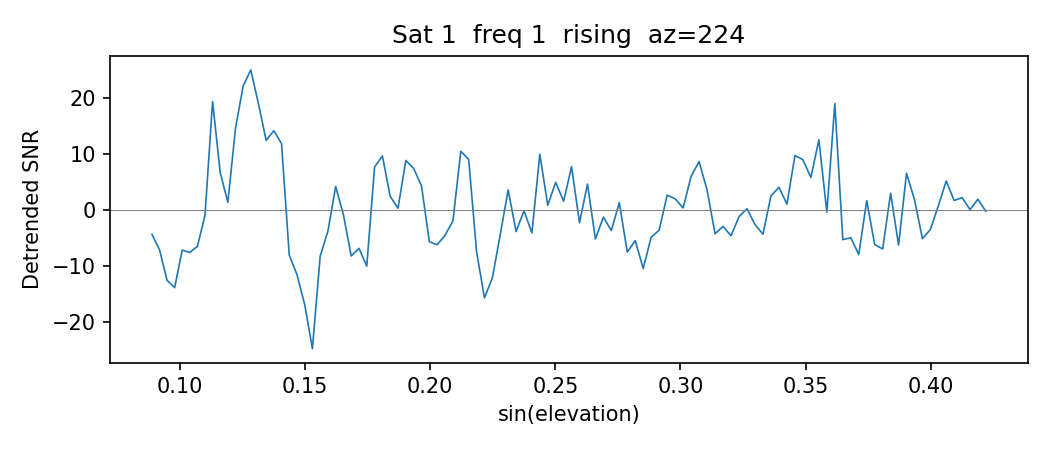
Plot 1: Detrended SNR vs sin(elevation)
This is the fundamental GNSS-IR observable. The interference pattern between the direct and reflected signals oscillates at a frequency proportional to the reflector height.
# sat 14 has one of the strongest interference patterns on this day
meta, data = [(m, d) for m, d in arcs if m['sat'] == 14][0]
x = np.sin(np.radians(data['ele']))

fig, ax = plt.subplots()
ax.plot(x, data['snr'])
ax.set_xlabel('sin(elevation)')
ax.set_ylabel('Detrended SNR')
ax.set_title(f"Sat {meta['sat']}  freq {meta['freq']}  "
             f"{meta['arc_type']}  az={meta['az_min_ele']:.0f}")
fig.tight_layout()
plt.show()
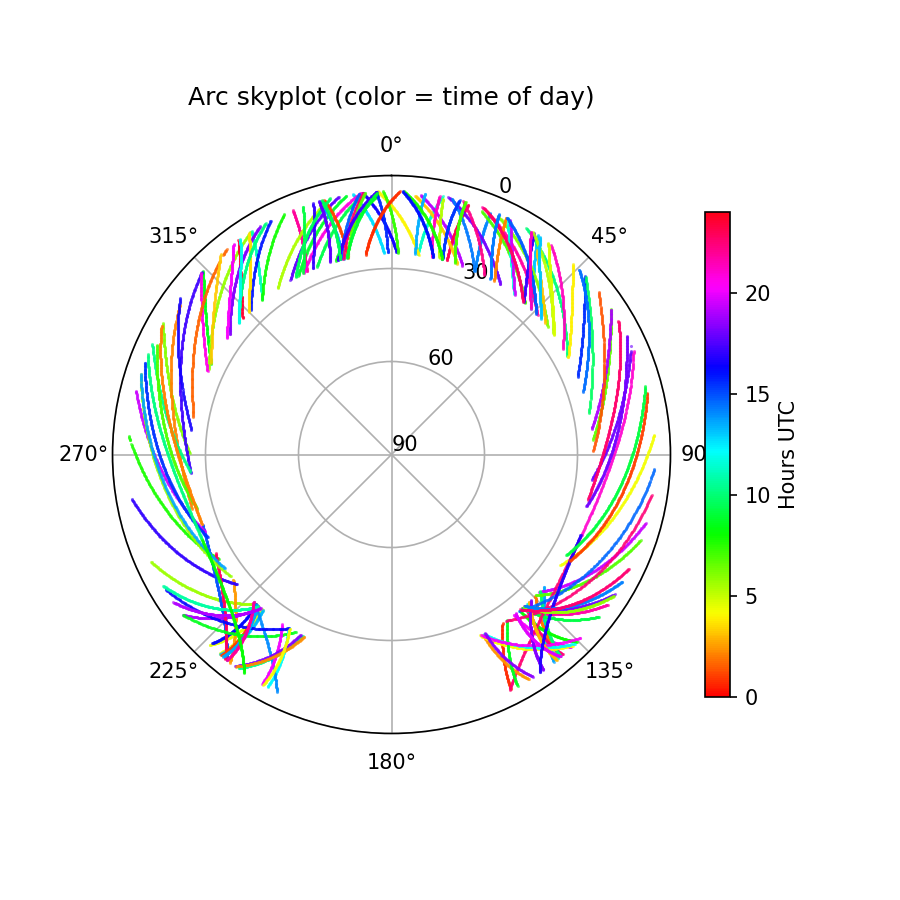
Plot 2: Polar skyplot
Shows spatial coverage and which azimuths are observed at each time of day.
fig, ax = plt.subplots(subplot_kw={'projection': 'polar'}, figsize=(6, 6))
ax.set_theta_zero_location('N')
ax.set_theta_direction(-1)
norm = plt.Normalize(0, 24)

for meta, data in arcs:
    az_rad = np.radians(data['azi'])
    r = 90 - data['ele']          # radial axis = zenith angle
    color = plt.cm.hsv(norm(meta['arc_timestamp']))
    ax.plot(az_rad, r, '.', color=color, markersize=1, alpha=0.6)

ax.set_ylim(0, 90)
ax.set_yticks([0, 30, 60, 90])
ax.set_yticklabels(['90', '60', '30', '0'])
ax.set_title('Arc skyplot (color = time of day)')

sm = plt.cm.ScalarMappable(cmap='hsv', norm=norm)
sm.set_array([])
fig.colorbar(sm, ax=ax, label='Hours UTC')
plt.show()
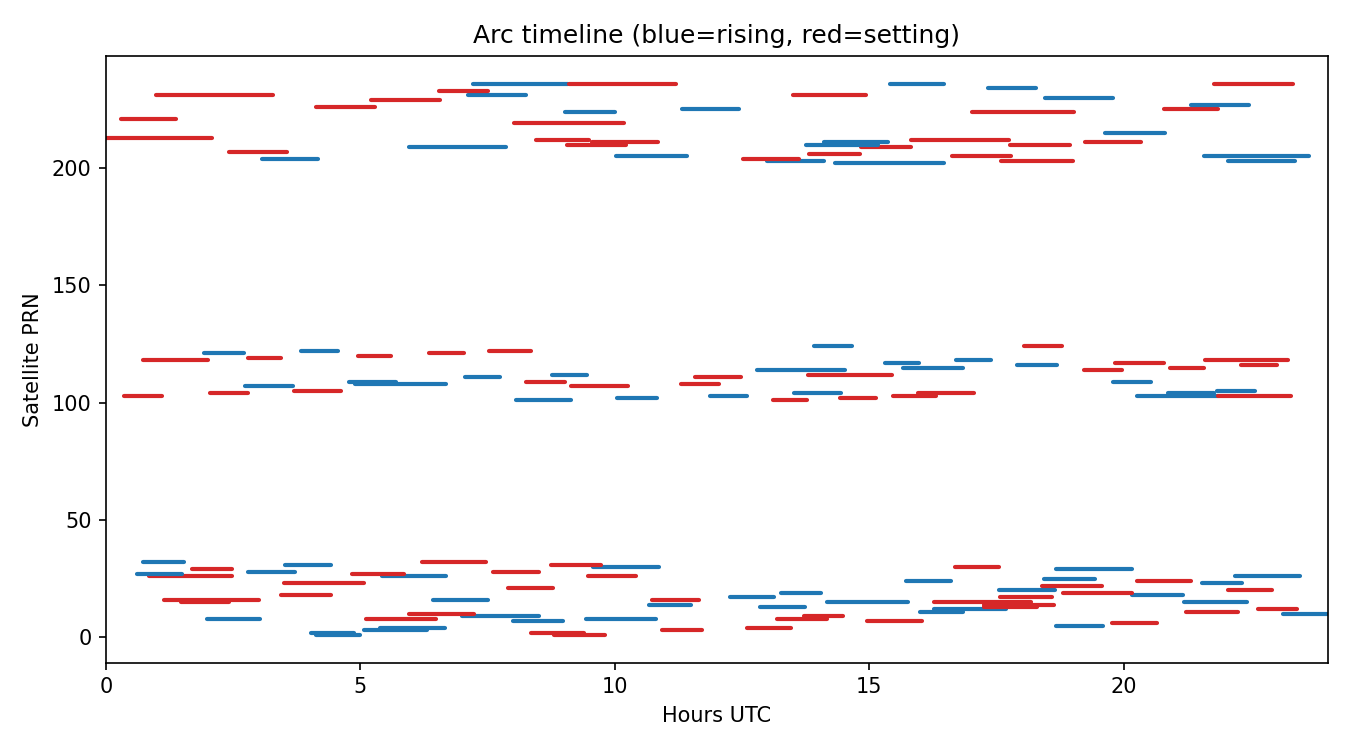
Plot 3: Arc timeline
Shows when each satellite is observed and whether the arc is rising or setting. This motivates the midnight-crossing discussion below.
fig, ax = plt.subplots(figsize=(9, 5))
for meta, data in arcs:
    t0 = meta['time_start'] / 3600
    t1 = meta['time_end'] / 3600
    color = 'tab:blue' if meta['arc_type'] == 'rising' else 'tab:red'
    ax.plot([t0, t1], [meta['sat'], meta['sat']],
            color=color, linewidth=2, solid_capstyle='round')

ax.set_xlabel('Hours UTC')
ax.set_ylabel('Satellite PRN')
ax.set_xlim(0, 24)
ax.set_title('Arc timeline (blue=rising, red=setting)')
fig.tight_layout()
fig.show()
Linking Arcs to Processing Results
Pass attach_results=True to match each arc back to its gnssir and phase output. Each arc’s metadata gains two new keys: gnssir_processing_results and phase_processing_results. Arcs that were rejected by QC get None.
gnssir_processing_results keys:
Key |
Type |
Description |
|---|---|---|
|
float |
Reflector height (m) |
|
float |
LSP amplitude (volts/volts) |
|
float |
Peak-to-noise ratio |
|
float |
Modified Julian Date |
|
float |
UTC time (hours) |
|
float |
Azimuth (deg) |
|
float |
Observed minimum elevation (deg) |
|
float |
Observed maximum elevation (deg) |
|
int |
Number of observations used |
|
float |
Arc duration (minutes) |
|
float |
Elevation rate factor |
|
int |
Refraction model applied (1=yes, 0=no) |
|
int |
1 = rising, -1 = setting |
phase_processing_results keys:
Key |
Type |
Description |
|---|---|---|
|
float |
Estimated phase (deg) |
|
int |
Number of observations used |
|
float |
Azimuth (deg) |
|
float |
LSP amplitude (volts/volts) |
|
float |
Minimum elevation (deg) |
|
float |
Maximum elevation (deg) |
|
float |
Arc duration (minutes) |
|
float |
A priori reflector height (m) |
|
float |
Estimated reflector height (m) |
|
float |
Peak-to-noise ratio |
|
float |
LSP amplitude at estimated RH |
Plot 4: Highest vs lowest amplitude arc
With the processing results attached, you can sort arcs by any QC metric and immediately plot the underlying SNR data to see why an arc scored high or low.
arcs = extract_arcs_from_station('p038', 2025, 99, attach_results=True)

matched = [(m, d) for m, d in arcs if m['gnssir_processing_results'] is not None]
print(f'{len(arcs)} arcs extracted, {len(matched)} passed QC')
# 237 arcs extracted, 50 passed GNSSIR QC

matched.sort(key=lambda x: x[0]['gnssir_processing_results']['Amp'])
hi_meta, hi_data = matched[-1]
lo_meta, lo_data = matched[0]

fig, (ax1, ax2) = plt.subplots(2, 1, figsize=(7, 5), sharex=True, sharey=True)
ax1.plot(np.sin(np.radians(hi_data['ele'])), hi_data['snr'], lw=0.8)
ax1.set_title(f"Highest: sat {hi_meta['sat']} {hi_meta['arc_type']} Amp={hi_meta['gnssir_processing_results']['Amp']:.1f} PkNoise={hi_meta['gnssir_processing_results']['PkNoise']:.1f}")
ax2.plot(np.sin(np.radians(lo_data['ele'])), lo_data['snr'], lw=0.8, color='tab:orange')
ax2.set_title(f"Lowest: sat {lo_meta['sat']} {lo_meta['arc_type']} Amp={lo_meta['gnssir_processing_results']['Amp']:.1f} PkNoise={lo_meta['gnssir_processing_results']['PkNoise']:.1f}")
ax2.set_xlabel('sin(elevation)')
fig.tight_layout()
plt.show()
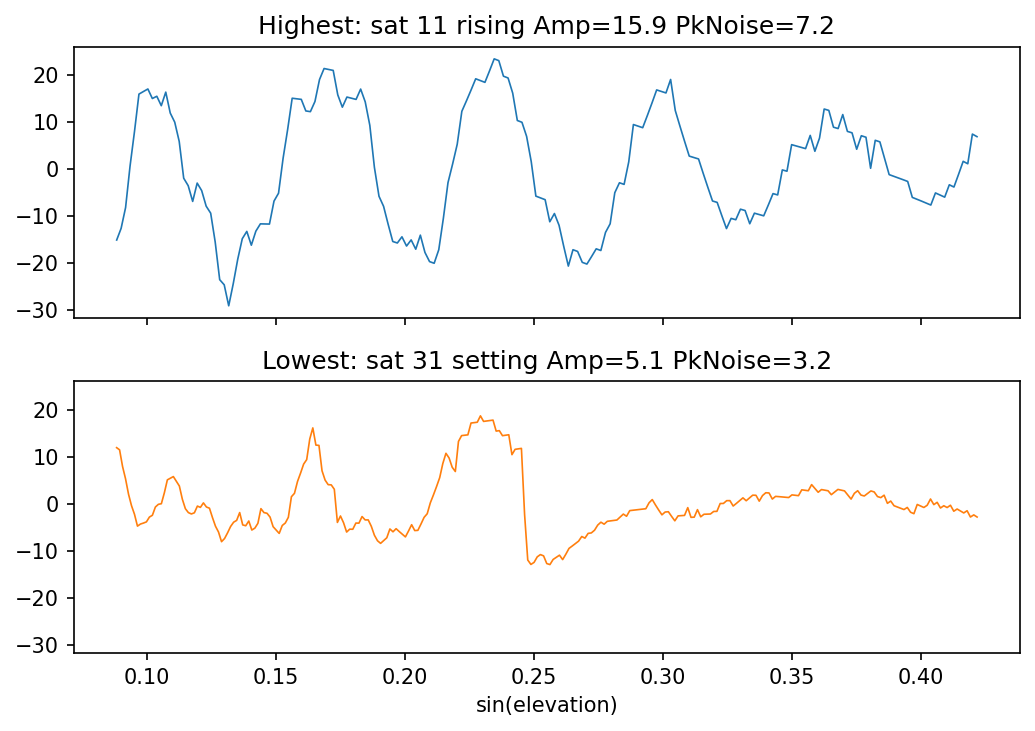
The lowest amplitude arc (Amp=5.1, PkNoise=3.2) is borderline. The interference pattern is barely visible at higher elevations. Tightening the ampl or pk2noise thresholds in the JSON would reject arcs like this.
Plot 5: Comparing arcs across days
Extracting the same satellite track on consecutive days lets you visualize day-to-day changes in the interference pattern. Here we pull sat 3 (setting, az~187) on p038 DOY 183 and 184, 2023:
p038_doy183 = extract_arcs_from_station('p038', 2023, 183, freq=20, sat_list=[3], attach_results=True)
p038_doy184 = extract_arcs_from_station('p038', 2023, 184, freq=20, sat_list=[3], attach_results=True)

fig, ax = plt.subplots(figsize=(7, 3))
for arcs, doy in [(p038_doy183, 183), (p038_doy184, 184)]:
    # sat 3 arc nearest az=187
    meta, data = min(arcs, key=lambda a: abs(a[0]['az_min_ele'] - 187))
    p = meta['phase_processing_results']
    ax.plot(np.sin(np.radians(data['ele'])), data['snr'], label=f"DOY {doy}  phase={p['Phase']:.0f}" + r"$^\circ$")
ax.set_xlabel('sin(elevation)')
ax.set_ylabel('Detrended SNR')
ax.set_title(f"p038 sat 3 {meta['arc_type']} az={meta['az_min_ele']:.0f}" + r"$^\circ$" + " - consecutive days")
ax.legend()
fig.tight_layout()
plt.show()
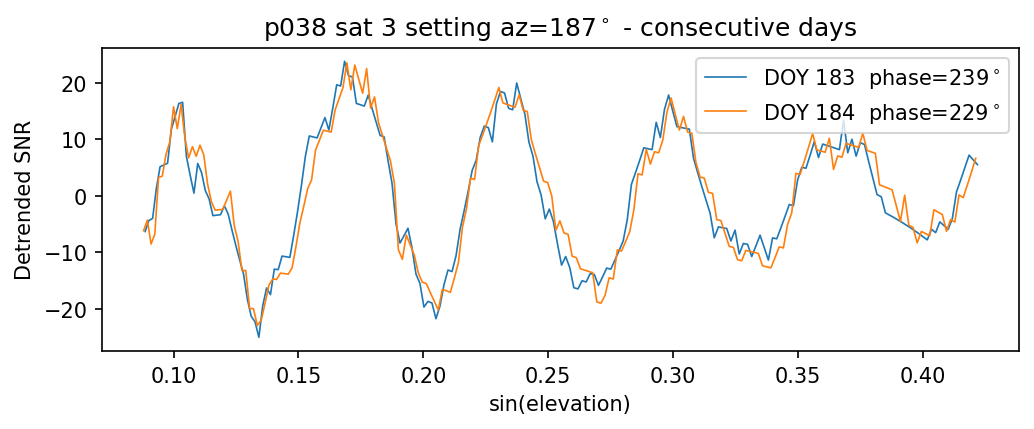
The interference patterns are nearly identical but shifted. The 10 degree phase change between these two days may correspond to a change in near-surface soil moisture.
Midnight-Crossing Arcs
SNR files cover one UTC day. Arcs in progress at midnight get split across two
files and are usually too short to pass QC. Pass buffer_hours=2 to
automatically load adjacent-day data with shifted time tags (previous day gets
negative seconds, next day exceeds 86400). Adjacent-day files are located by
name from the standard $REFL_CODE/{yyyy}/snr/{station}/ directory; a warning
is printed if either neighbour is missing.
# Buffer by two hours before/after the specified day
arcs = extract_arcs_from_station('mchl', 2025, 10, freq=20, buffer_hours=2)

# Find a midnight-crossing arc and plot it
for meta, data in arcs:
    secs = data['seconds']
    if np.any(secs > 86400):  # has next-day buffer data
        main = secs <= 86400
        buf = ~main
        x = np.sin(np.radians(data['ele']))
        plt.plot(x[main], data['snr'][main], 'o-', ms=2, lw=0.8, label='Day N')
        plt.plot(x[buf], data['snr'][buf], 'o-', ms=2, lw=0.8, label='Day N+1 buffer')
        plt.legend(); plt.xlabel('sin(elevation)'); plt.ylabel('Detrended SNR')
        break
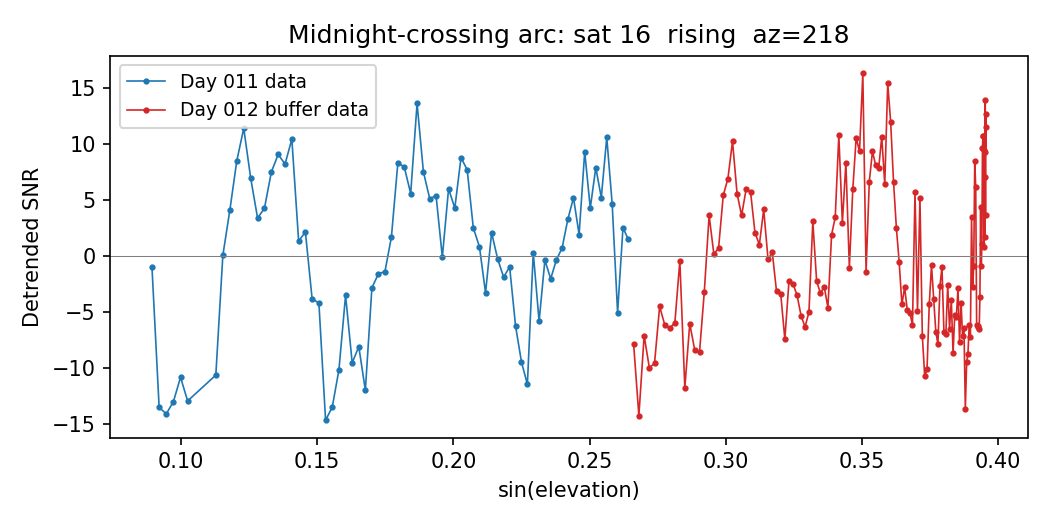
When processing consecutive days with buffer_hours, filter_to_day=True
(the default) prevents double-counting by only returning arcs whose midpoint
falls within 0-24 hours UTC.
Working with Raw Arrays
If you already have SNR data as a numpy array (e.g. from custom loading or
testing), you can call extract_arcs() directly:
arcs = extract_arcs(snr_array)                       # all frequencies
arcs = extract_arcs(snr_array, freq=1, e1=5, e2=25)  # L1 only
The array must have columns: [sat, ele, azi, seconds, edot, snr_col1, ...].
This is the same format returned by read_snr() and np.loadtxt() on an SNR
file.